Zenburn
Posted By slinky On April 30, 2008 @ 19:36 In | 150 Comments
This is the The Official Zenburn Page
Zenburn is a low-contrast color scheme for Vim. It’s easy for your eyes and designed to keep you in the zone for long programming sessions.
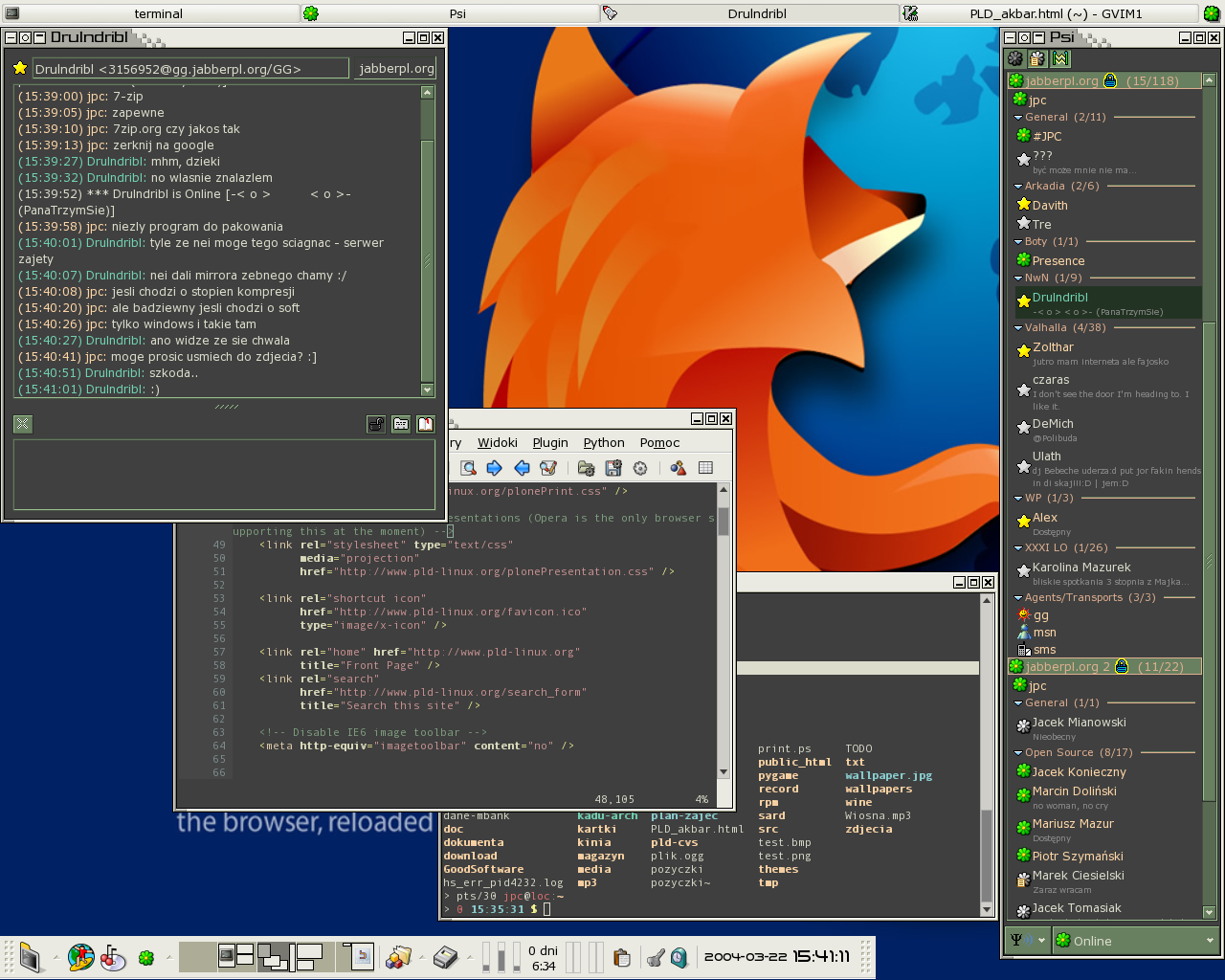
Screenshot of Zenburn in normal contrast mode:
 [1]
[1]
What’s the purpose of this page?
The Wikipedia page for Zenburn is officially deleted [2], therefore this page attempts to replace the wiki page as a nexus for Zenburn-related information. Unfortunately, unlike a wiki this page is not editable by everyone.
A page is easier to upkeep than a post, plus editing a page doesn’t mess up the RSS feeds (unlike editing a post which was posted a long time ago in the past). That’s why there is now this brand spanking new Official Page.
Latest version and background information
- Zenburn.vim [3]
- Old skool official page [4]
- History of Zenburn [5]
- One day Zenburn was in Slashdot’s comments [6] (and the server nearly melted)
- Screenshot [7]!
- Page at vim.sf.net [8]
- Zenburn at Github [9]

Notes
To use Zenburn in GVim, simply copy the file to colors/ subdirectory under your Vim configuration folder (e.g. ~/.vim/colors or C:\vim\colors).
To use Zenburn in Vim, you must enable the 256-color mode for Vim [10]. This can be done with e.g. export TERM=xterm-256color. You might also need to add set t_Co=256 into your .vimrc file, before loading the colorscheme. Note, that due to limitations of the 256-color mode the color scheme is not exactly like it appears in GVim, but very close nevertheless.
Have a look at Darmawan’s page [11] for further information and screenshots.
List of known ports and derivatives
- Zenburn for KDE konsole [12] by Christoffer Sawicki. See also below for Konsole 2.0.
- Daniel Brockman had
a page with many adaptations [13](Link dead). Daniel’s Emacs version [14] still exists at Github. - Zenburn scheme ported to Visual Studio 2005 [15] by Jeff Atwood
- Jakub Piotr C?apa Zenburnt his entire desktop [16]!
- [17] by Dominykas Dja?enka.
- SubEthaEdit Zenburn [18] by Henrik Bergius.
- “Dark Zenburn Global Style” [19] for Stylish browser plugin.
- Zenburn for KDevelop/Kate [20] by Lukasz “Lookanio” Purgal.
- Zenburn for KDE3 [21] by Kevin Geiss.
- Putty colors [22] by Steve T.
- Marc Kerbiquet uses Zenburn in his Code Browser [23] software.
- Andrew Janke did a Zenburn-configuration file for Gnome Terminal [24]. See also his comment below.
- Jonathan Bonomo made a color scheme for sterjm [25] (project page [26]). You can download the file here [27].
- Hisham [28] made a Typo/CSS Zenburn theme.
- Juhapekka Tolvanen [29] made a Zenburn config [30] for ctheme [31].
- Zenburn for Konsole redux [32] by Craig. It’s for Konsole 2.0 (KDE4). Apologies to Craig since I had somehow overlooked his link from the old page.
- Zenburn Blogger template [33] with syntax highlighting for code examples, by Elijahr.
- “Zenburn-like color scheme with terminus/proggyclean fonts for terminals and emacs.” [34] Cheers to Nick C [35] for pointing it out.
- Windows cmd.exe port [36] (also for Powershell) by Twinside.
- Adrian C [37] has a whole bunch of Zenburn things [38], including a Zenburn theme for the Awesome WM [39] – have a look at the simply excellent screenshots [40]! You can read Adrian’s journal entry [41] too.
- Abchernin sent information about how to set up for EasyEclipse for Python 1.3.1 [42].
- Gianfranco did Zenburn for SciTE v1.78 [43].
- Gimp palette [44] by an anonymous contributor. It was cool to see all the colours in one place.
If you have made a new port, please drop a mail or comment to get it included here.
Thank you for enjoying “Just some alien fruit salad to keep you in the zone”!
Article printed from With sufficient thrust, pigs fly just fine.: http://slinky.imukuppi.org
URL to article: http://slinky.imukuppi.org/zenburnpage/
URLs in this post:
[1] Image: http://slinky.imukuppi.org/wpress/wp-content/uploads/2008/04/zenburn.png
[2] officially deleted: http://deletionpedia.dbatley.com/w/index.php?title=Zenburn
[3] Zenburn.vim: http://slinky.imukuppi.org/zenburn/zenburn.vim
[4] Old skool official page: http://slinky.imukuppi.org/zenburn/
[5] History of Zenburn: http://slinky.imukuppi.org/2006/10/31/just-some-alien-fruit-salad-to-keep-you-in-the-zone/
[6] Zenburn was in Slashdot’s comments: http://slinky.imukuppi.org/2008/04/09/my-morning-just-got-a-lot-better/
[7] Screenshot: http://slinky.imukuppi.org/zenburn/zenburn.png
[8] Page at vim.sf.net: http://vim.sourceforge.net/scripts/script.php?script_id=415
[9] Zenburn at Github: https://github.com/jnurmine/Zenburn
[10] enable the 256-color mode for Vim: http://vim.wikia.com/wiki/256_colors_in_vim
[11] Darmawan’s page: http://darmawan-salihun.blogspot.com/2008/07/tweaking-vim-for-fun-and-profit.html
[12] Zenburn for KDE konsole: http://termos.vemod.net/zenburn-for-konsole
[13] a page with many adaptations: http://www.brockman.se/software/zenburn/
[14] Emacs version: https://github.com/dbrock/zenburn-el
[15] Zenburn scheme ported to Visual Studio 2005: http://www.codinghorror.com/blog/archives/000682.html
[16] Zenburnt his entire desktop: http://toya.net.pl/~loc/screen/zenburn-everywhere.png
[17] Zenburn ported to Notepad++: http://chaosteil.googlepages.com/stylers.xml
[18] SubEthaEdit Zenburn: http://bergie.iki.fi/blog/zenburn_colors_for_php_editing_in_subethaedit.html
[19] “Dark Zenburn Global Style”: http://userstyles.org/styles/1603
[20] Zenburn for KDevelop/Kate: http://www.kde-look.org/content/show.php/zenburn+-+eye-gentle+Kate+color+scheme?content=66209
[21] for KDE3: http://kde-look.org/content/show.php/Zenburn?content=78681
[22] Putty colors: http://www.darkrune.org/blog/?p=213
[23] Code Browser: http://code-browser.sourceforge.net/
[24] Gnome Terminal: http://mavis.anu.edu.au/ubuntu/zenburn-gnome-terminal/%25gconf.xml
[25] sterjm: http://home.gna.org/stjerm/
[26] project page: https://gna.org/projects/stjerm/
[27] here: http://slinky.imukuppi.org/zenburn/.Xdefaults
[28] Hisham: http://hisham.cc/
[29] Juhapekka Tolvanen: http://iki.fi/juhtolv
[30] Zenburn config: http://iki.fi/juhtolv/configs/ctheme/
[31] ctheme: http://sourceforge.net/projects/ctheme/
[32] Zenburn for Konsole redux: http://usrlocalbin.blogspot.com/2008/04/zenburn-for-konsole-redux.html
[33] Zenburn Blogger template: http://elijahr.blogspot.com/2008/12/zenburn-blogger-template-with-syntax.html
[34] “Zenburn-like color scheme with terminus/proggyclean fonts for terminals and emacs.”: http://dotfiles.org/~jbromley/.Xresources
[35] Nick C: http://unintelligible.org/blog
[36] Windows cmd.exe port: http://twinside.free.fr/dotProject/?p=125
[37] Adrian C: http://sysphere.org/~anrxc/j/
[38] whole bunch of Zenburn things: http://sysphere.org/~anrxc/j/articles/zenburn/index.html
[39] Awesome WM: http://awesome.naquadah.org/
[40] excellent screenshots: http://sysphere.org/gallery/snapshots/awesome
[41] journal entry: http://sysphere.org/~anrxc/j/archives/2009/03/08/index.html#e2009-03-08T21_34_45.txt
[42] EasyEclipse for Python 1.3.1: http://slinky.imukuppi.org/2009/06/21/zenburn-for-easyeclipse-for-python-131/
[43] Zenburn for SciTE v1.78: http://slinky.imukuppi.org/2009/07/25/zenburn-for-scite-v178/
[44] Gimp palette: http://slinky.imukuppi.org/zenburn/Zenburn.gpl
Click here to print.