 Print This Post
Zenburn for EasyEclipse for Python 1.3.1
Abchernin has sent a step-by-step guide how to enable Zenburn colors into EasyEclipse for Python v1.3.1 – it should work with any Eclipse+pydev combination.
Let’s hear it from the man himself :)
“This was applied to EasyEclipse for Python 1.3.1, but I guess it should work well with simple Eclipse + PyDev combo as well.
First, go to Window -> Preferences. Now, select PyDev. You should see “Appearance color options:” section with a list of code elements and color-representing button left to it. To change a color for the element, click that button, then set the custom color in R/G/B palette (=copy-paste the RGB triplet to the “Color Name” box –slinky). The colors and font styles I used are the following:
- Code: #d8d8c8
- Decorators: #30d230, italic
- Numbers: #8cc8c8
- Matching Brackets: #408080
- Keywords: #f0dcaf, bold
- Self: #d8c8c8, italic
- Strings: #c89191, italic
- Comments: #82aa8c, italic
- Backquotes: not really sure what that is, so don’t know what color it should be using. Set one of your own.
- Class: #f0f08c, bold (I personally use #c8c84b, but that’s my little mindbugs =) )
- Function: #f0f08c, bold
Ok. Now, still in the Preferences window, select General/Text Editors. There’s same “Appearance color options:” section. Set:
- Line Number Foreground: #9bafaf
- Current Line Highlight: #555555
- Print Margin: #808080
- Find Scope: #555564
- Selection Foreground: #be19a0 (this one is based on Vim’s crazy omnicompletion background, my pick)
- Selection Background: #555555
- Background color: #3f3f3f
That should do it.”
Thank you abchernin!
See below for screenshots:
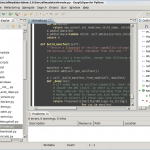
ZenBurn in EasyEclipse, windowed mode
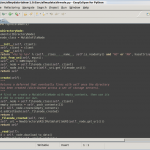
Zenburn in EasyEclipse, maximized

9 Comments so far
Leave a comment
what is the difference between easyeclipse and the normal eclipse ?,
i will the flying pig as wallpaper ;)
By David Cresces on 07.07.09 14:48
David, EasyEclipse is basically Eclipse which comes pre-configured with plugins for Python, Ruby etc. Handy if one does development with those languages.
I like the flying pig too :)
By slinky on 07.25.09 15:59
Hi, on eclipse,I need to specify the R/G/B values separately.. how do I use the hex values?
By John on 07.26.09 15:42
John, you can enter the hex triplet (e.g. #123456) into a box called “color name” in the color chooser dialog.
By slinky on 07.26.09 17:31
http://474ed37b.qvvo.com Almost zenburn theme for eclipse gallileo. Paste it in eclipse\workspace\.metadata\.plugins\org.eclipse.core.runtime and rename to .settings
By Mysoor on 10.30.09 10:50
If you go over here: http://blog.edwards-research.com/2009/11/color-schemes-for-eclipse-cdt-4/
you can run a theme generator for eclipse. It’s alpha, but generates the right stuff.
By Luis on 11.14.09 0:32
Thanks for this. Wish there were better theme management tools for eclipse and its derivatives but this works great.
By lp on 09.04.10 22:35
I did this to Eclipse Helios with PyDev 1.6.3, then exported the preferences, deleted everything irrelevant and put the result here:
https://gist.github.com/748084
Feel free to download and import :)
By Ilya Vassilevsky on 12.20.10 7:30
Thank you Ilya!
By slinky on 12.21.10 22:46
Leave a comment
Line and paragraph breaks automatic, e-mail address never displayed, HTML allowed: