Zenburn for Emacs and More

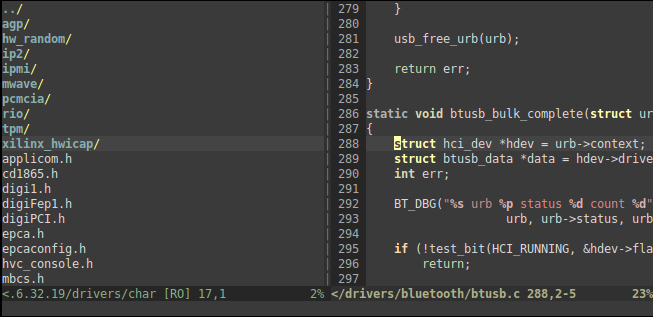
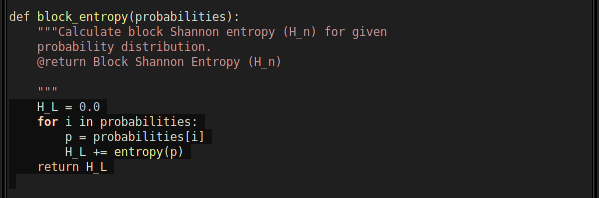
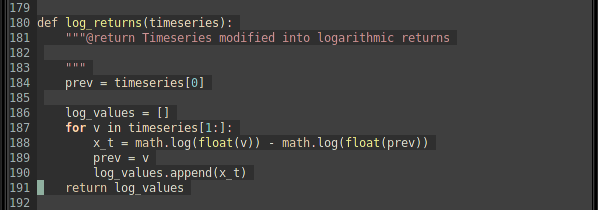
Thanks to Bozhidar Batsov, there is now a new Emacs port of Zenburn. It’s not a rewrite of Daniel Brockman’s version, but a completely new one. You can find the zenburn-emacs from Github. Be sure to check the blog post too.

Bozhidar also ported Zenburn to the Jekyll static site generator for Ruby, you can get the css for Jekyll here. I like it, it looks very good and especially the code blocks look great :) To see a live example, have a look at this blog post.

Good stuff. Thank you very much, Bozhidar!

Zenburn v2.21

New version, v2.21, contains color fixes for the Folded, FoldColumn and TabLine colors. The colors are also aligned in both UI and 256-color versions. Many thanks to Paweł Piekarski – lay off the coffee man ;)

Note: Originally I intended to fix the “TODO” around this area in version v2.19 fast, and submit a new version the next day. But what can one do, things don’t always work as planned… I had no time to do that. The Folded, FoldColumn and TabLine in v2.19 were quite messed up. Now they work OK!

Here’s a console Zenburn with :set fdc=4 and :set tabline.

Zenburn with fdc and TabLine in 256-color mode.

Grab the fresh copy from vim.sf.net or from the official Zenburn page.

Stay in the zone!

Zenburn v2.19

v2.19 has been stewing like a ragù, and now it’s done.

Changes

  • LineNr bugfix, fix for directory styles; thank you to Clayton Parker.
  • Christophe-Marie Duquesne suggested support for . Thanks! I like the idea of more fine-grained syntax groups. Experimental support is now in and will be enabled if you have the plugin. If you want to disable it manually, let g:zenburn_disable_ctags_highlighting_support = 1. Help is needed with this one.
  • New darker Visual is now the default. It doesn’t stick out now and fits the overall colourscheme better even with LineNr. Using the old-style Visual is still possible: let g:zenburn_old_Visual = 1.

Screen shots

Looks repetitive? Console and Gvim do look quite much the same, but then again, that’s the point :)

Download it!

You can download Zenburn v2.19 from Vim.sf.net or from the Zenburn page.

As usual, please see the Zenburn.vim for more details, and happy zenburning!

Mac Zenburners Ahoy!

Today is your lucky day.

Pietra Arumaga mailed me to say he has a couple of useful Zenburn-related posts for users of MacVim and Komodo.

The first one is “MacVim as IDE with Code Completion and Syntax Highlighting for Python, PyQt4 and Twisted Development on Mac OSX Snow Leopard” and the second is a downloadable Zenburn zip for Komodo Edit/IDE.

If you use a nice white-colored computer with a fruit logo on it, check it out. And thank you to Pietra!

Earthquake in Japan

And not only just a big earthquake, but a tsunami AND a nuclear disaster, too. Just terrible.

I think the picture below speaks for itself.

Awesome Site of the Week

I was looking for hieroglyph examples of Aztec and Mayan writing – just for fun, and to practise acrylic painting skillz by trying to paint such glyphs. Through some googling I found this site: Ancient Scripts, a “compendium of world-wide writing systems from prehistory to today”. Wow!

The site is pretty extensive, with background information about each culture, explanation of the language itself and the writing system used, and so on. However, the most surprising part is that the creator of the site isn’t some professor of linguistics, but rather a software engineer by the name of Lawrence Lo, who just does it as a labor of love. Through having a massive interest in a subject, a lot of things are possible.

Have a look at the “Ancient Scripts”.

The Venusian Emperor

From the Wikipedia page for Ashen light:
“Ashen light is a subtle glow that is seen from the night side of the planet Venus.”

“Before the development of more powerful telescopes, early astronomer Franz von Gruithuisen [March 19, 1774 – June 21, 1852] believed that Ashen light was from the fires from celebration of a new Venusian emperor, and later believed that it was the inhabitants burning vegetation to make room for farmland.”

Nice theories, don’t you think? It was likely the best speculation of its time, but just consider how human culture centric those thoughts really were.

1. “fires from celebration of a new Venusian emperor” = Venus has an emperor – implying a hierarchical society – celebrations are conducted on a primitive fashion through the lighting of massive planet-wide fires.
(more…)

Fixing Low Pitched Voice Call Audio in Skype

I don’t really use Skype at home that often. Today I did, and I ran into a problem which I remembered having a long time ago: the voice call audio from me to others sounds lower in pitch, like Darth Vader, or one of those “voice altered to protect the identity” things on TV.

This time, I was arsed enough to fix the Skype issue.

The cause is quite simple: Skype’s SILK voice codec wants to record audio in 24 kHz. However, my HD Audio using Realtek ALC883 chip does not support that sampling rate. Instead, it defaults to 44.1 kHz. The result sounds interesting, but useless for talking over Skype.

So how to fix this? Theory of operation: whatever sampling rate Skype asks you for, just say yes, record in whatever the hardware supports, then rate convert to the sampling rate asked by Skype. This will solve the problem.

To do this in practise, using ALSA, is as follows. First, quit Skype. Don’t just log out, quit the whole thing.

Then, let’s add a software SRC into the proper point in the voice audio uplink path (nerdy!) by adding the following to your ~/.asoundrc:

pcm.skype {
    type plug
    slave {
        # normal ALC883
        pcm "hw:0,0"                                                                         

        # skype wants 24 kHz recording input,
        # but ALC883 doesn't support that.
        # do a rate conversion on the fly.
        rate 48000
    }
}

Note: change the pcm “hw:0,0″ line to whatever is your device – this one uses the default.

To test your new .asoundrc, you can use the command arecord -f S16_LE -c 2 -r 24000 -D skype -d 20 test.wav

If the recording gave no errors, play it back with aplay test.wav. If it sounds OK, you’re good to go.

Next, start Skype. Then go to Options, and set the recording audio device to be “(plug) skype”.

It worked for me, testing using Skype’s echo123 service yields crystal clear audio!

Simple Statemachine for Python

My secret evil scientist projects needed a simple and straightforward way to implement (Mealy) FSAs in Python. I didn’t find an appropriate one, so I made one from scratch which turned out to be a fun learning experience.

You can download it here: statemachine.zip

It’s quite simple to use, please see the runner.py and runner2.py scripts for a demonstration.

The major “selling point” here is that it’s light-weight, and each state defines the transitions; there is no global transition-table. I find it simpler to implement state machines in such OO way. When the FSA is sketched (on paper! Yep I’m old skool), I find it easier to map the transitions correctly by just focusing on one state at a time, seeing what conditions transition to it, what outputs/actions does it make (I don’t really use Moore) and where does it transition to, and so on.

If you need a quick-and-dirty agile and simple solution, do have a look.

There are downsides: each State-derived state-specialization has to be unique (currently it’s not possible to “share” a state class instance by variating an instance to become a different state based on parameters given during construction time, this is due to the way the FSA builds a list of the states; it’s easy to change though), and you have to pass data either in some data container class, or use global variables.

How to use it

Please see runner.py and runner2.py.

In a nutshell: Inherit your specialized states from State. Implement enter, work or exit methods, you need at least the work-method. State transition is done in the work-method: return states[SomeClass] to transition to SomeClass, or return STATE_MACHINE_EXIT when the FSA is done.

The initialization is done by giving the FSA class a list of your state instances in the constructor. The initializing state must be the first one in the list. Then you can refer to these state instances inside the states with states[SomeStateClassOfYours].

Run the FSA by calling work() on it. It returns a generator, so that you can run the FSA in steps, if needed.

“Get Your Ass to Mars”

I’m a space exploration buff and when it comes to colonizing places outside of the Earth, especially Mars, I’m all ears.

There are many reasons for my enthusiasm, one of the biggest being that humanity as a race and civilization is 100% certainly doomed if we choose to hole up on the Earth. For example, a cataclysmic asteroid hit is a matter of time – maybe not in my lifetime, nor the 10 following lifetimes, but it is inevitable nevertheless. There are a plethora of other threats as well.

Now, to my delight I saw The Human Mission to Mars – Colonizing the Red Planet in the Journal of Cosmology. If you are interested in space exploration, be sure to bookmark and read that!

Then you can muse, for example, whether you would be willing to go for a one-way mission to Mars. A quick answer of “yes” might turn into “no” once you think of what you’ll be leaving behind. And vice versa, when you think of the new, uncharted territories and a new, free life that awaits you. And once you think what new things and new opportunities you’d attain on Mars, consider this: would it not be easier to attain those here, where the climate outside your dwelling is not yet hostile to human life?

As said, sure to raise thoughts. With this link I wish you a pleasant reading on the wee hours of a happy, new 2011!

PS. For a more (science) fictious approach, I can recommend the Red Mars, Green Mars, and Blue Mars book trilogy by Kim Stanley Robinson.

« Previous Page — previous »
« newer — Next Page »