
Zenburn
This is the The Official Zenburn Page
Zenburn is a low-contrast color scheme for Vim. It’s easy for your eyes and designed to keep you in the zone for long programming sessions.
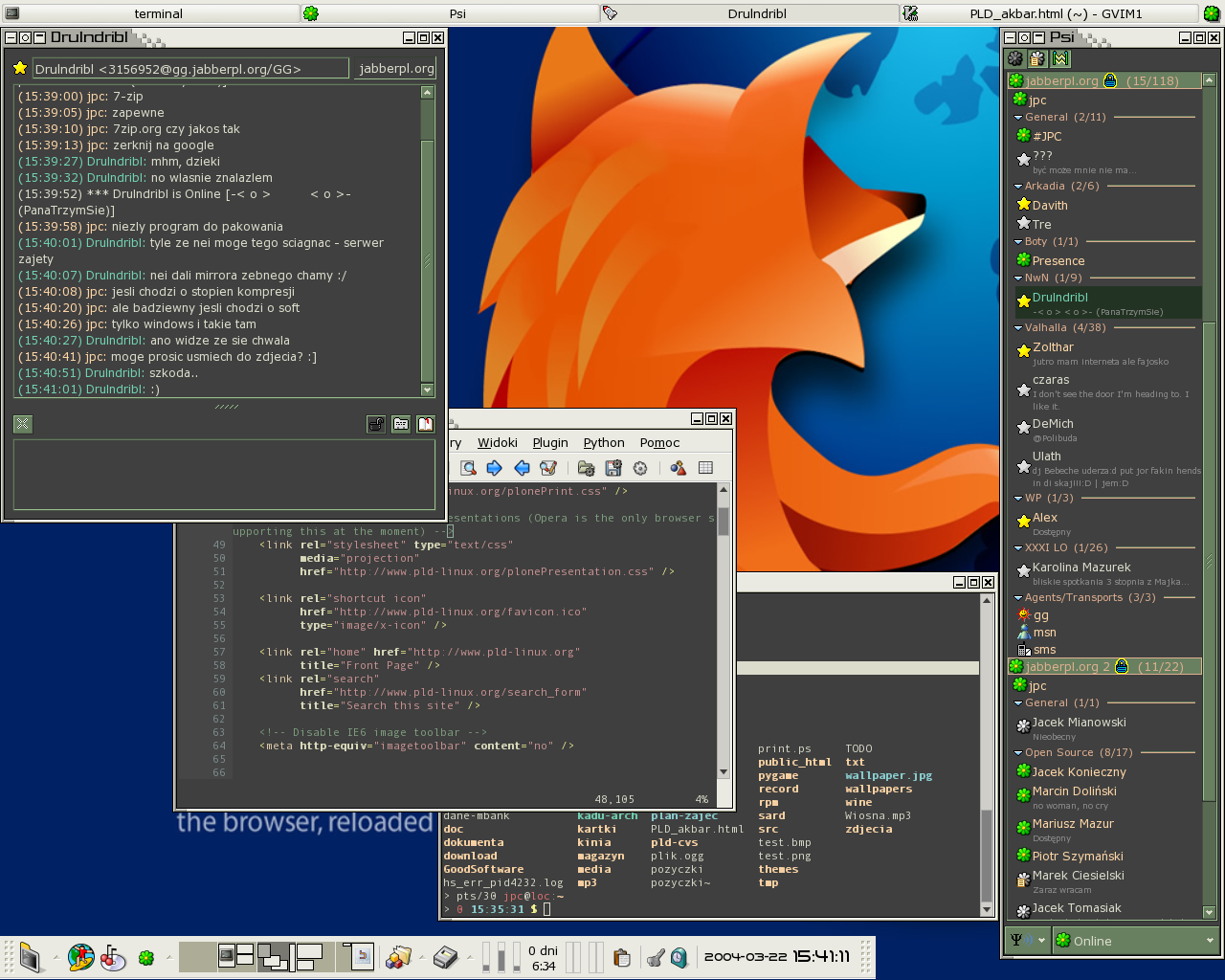
Screenshot of Zenburn in normal contrast mode:

What’s the purpose of this page?
The Wikipedia page for Zenburn is officially deleted, therefore this page attempts to replace the wiki page as a nexus for Zenburn-related information. Unfortunately, unlike a wiki this page is not editable by everyone.
A page is easier to upkeep than a post, plus editing a page doesn’t mess up the RSS feeds (unlike editing a post which was posted a long time ago in the past). That’s why there is now this brand spanking new Official Page.
Latest version and background information
- Zenburn.vim
- Old skool official page
- History of Zenburn
- One day Zenburn was in Slashdot’s comments (and the server nearly melted)
- Screenshot!
- Page at vim.sf.net
- Zenburn at Github
Notes
To use Zenburn in GVim, simply copy the file to colors/ subdirectory under your Vim configuration folder (e.g. ~/.vim/colors or C:\vim\colors).
To use Zenburn in Vim, you must enable the 256-color mode for Vim. This can be done with e.g. export TERM=xterm-256color. You might also need to add set t_Co=256 into your .vimrc file, before loading the colorscheme. Note, that due to limitations of the 256-color mode the color scheme is not exactly like it appears in GVim, but very close nevertheless.
Have a look at Darmawan’s page for further information and screenshots.
List of known ports and derivatives
- Zenburn for KDE konsole by Christoffer Sawicki. See also below for Konsole 2.0.
- Daniel Brockman had
a page with many adaptations(Link dead). Daniel’s Emacs version still exists at Github. - Zenburn scheme ported to Visual Studio 2005 by Jeff Atwood
- Jakub Piotr C?apa Zenburnt his entire desktop!
- by Dominykas Dja?enka.
- SubEthaEdit Zenburn by Henrik Bergius.
- “Dark Zenburn Global Style” for Stylish browser plugin.
- Zenburn for KDevelop/Kate by Lukasz “Lookanio” Purgal.
- Zenburn for KDE3 by Kevin Geiss.
- Putty colors by Steve T.
- Marc Kerbiquet uses Zenburn in his Code Browser software.
- Andrew Janke did a Zenburn-configuration file for Gnome Terminal. See also his comment below.
- Jonathan Bonomo made a color scheme for sterjm (project page). You can download the file here.
- Hisham made a Typo/CSS Zenburn theme.
- Juhapekka Tolvanen made a Zenburn config for ctheme.
- Zenburn for Konsole redux by Craig. It’s for Konsole 2.0 (KDE4). Apologies to Craig since I had somehow overlooked his link from the old page.
- Zenburn Blogger template with syntax highlighting for code examples, by Elijahr.
- “Zenburn-like color scheme with terminus/proggyclean fonts for terminals and emacs.” Cheers to Nick C for pointing it out.
- Windows cmd.exe port (also for Powershell) by Twinside.
- Adrian C has a whole bunch of Zenburn things, including a Zenburn theme for the Awesome WM – have a look at the simply excellent screenshots! You can read Adrian’s journal entry too.
- Abchernin sent information about how to set up for EasyEclipse for Python 1.3.1.
- Gianfranco did Zenburn for SciTE v1.78.
- Gimp palette by an anonymous contributor. It was cool to see all the colours in one place.
If you have made a new port, please drop a mail or comment to get it included here.
Thank you for enjoying “Just some alien fruit salad to keep you in the zone”!


150 Comments so far
Leave a comment
Can you please put the colour refence table as it were from the wikipedia entry? It was very useful…
Thanks & keep up the good work.
I wonder who the idiot that asked to have the entry deleted was…
By J.H on 05.05.08 3:25
J.H., I don’t know who it was originally – my guess is some random Wikipedia admin.
As for the deletion, the article was deleted based on lack of notability. After reading the Wikipedia rules, I have to admit I agreed with the verdict to delete, as the article unfortunately did not reach the high level Wikipedia demands. I didn’t like it, but judging the article and the rules objectionably that’s the way it had to go :(
As for the color table, I’ll sure try to add it… if only I can find it from somewhere! It seems that the wikipedia entry has just vanished, as if it never existed. Or I don’t know how to look.
By slinky on 05.05.08 19:39
I copied the contents of the table to a spread sheet on my machine before they took down the page. I’ve uploaded it to google docs. I’ll color it when I get the chance.
By C Betancourt on 05.07.08 18:17
the link didn’t seem to work:
By C Betancourt on 05.07.08 18:18
Very good, C Betancourt! I shall make a task for myself to add the table here in the near future.
If you come up with the colors before I add the table, please put a comment here so then I’ll be sure to use the latest version.
By slinky on 05.08.08 20:01
You can get a “gnome-terminal” %gconf file here:
http://mavis.anu.edu.au/ubuntu/zenburn-gnome-terminal/%25gconf.xml
Just drop this in a directory called:
~/.gconf/apps/gnome-terminal/profiles/zenburn
and you are good to go. Note that I use a slightly transparent background for this one so perhaps you should increase the saturation of the background a bit but I like it this way!
a
By Andrew Janke on 06.30.08 3:47
I ported Zenburn for ctheme:
http://sourceforge.net/projects/ctheme/
http://iki.fi/juhtolv/configs/ctheme/
By Juhapekka Tolvanen on 07.05.08 14:58
I put Zenburn and Minimal (a TextMate color theme) together, made a similar one “MinimalZen” for EmEditor (http://www.EmEditor.com), you can find sreenshots in “” and my EmEditor color theme in “http://www.box.net/shared/dnj42nqyow”
By ToadLoading on 07.06.08 9:21
I found the
StatusLineto close to the background color, so I set it the same asStatusLineNC. Humbly submitted as a possible patch if you agree.By Charlie on 07.10.08 5:03
Hi Charlie!
I checked your patch, and agreed that the current StatusLine color was lousy. I took your patch in but had to edit it slightly, to be more in line with how GVim looks like.
Anyway, your name shall live forever in the Zenburn file itself, have a look at the latest version :) If you want your full name to be displayed, please send me a mail.
Thanks for spotting it!
By slinky on 07.10.08 20:51
Pardon my ignorance, but does this color scheme work with vim in a terminal or just gvim? I’ve tried using it in a terminal and it doesn’t look right.
By YDobon on 07.19.08 6:46
Ydobon, it works with both gvim and vim – however, one must have 256 colors enabled in the terminal for the colors to look right.
This can be done with
export TERM=xterm-256color, then launching vim. It works under Linux etc. but I’m not sure if that will work under a Windows prompt.…and if it still doesn’t seem to work, check that the terminal emulator supports 256 colors in the first place :)
Thank you Ydobon, I’ll update this page with instructions how to enable the 256-color mode.
By slinky on 07.19.08 10:01
First and foremost: great work. This colorscheme is tight, and I’m loving it.
However, I was running into the trouble under iTerm in osX wherein if I changed my terminal type to anything other than “builtin_ansi”, my arrow keys would stop working within vim. Took me a while, but I finally found a solution, which I thought I should share with anyone else running into the same problem. It’s http://www.vim.org/tips/tip.php?tip_id=550 , but it’s _NOT_ the actual tip, it’s the suggestion given in the first response there.
I know this isn’t strictly related to zenburn (so I won’t blame you if you kill this post), but manoman was it driving me crazy while I was trying to get your theme to work ;>
Again, great work. Now I need this ported as a theme for irssi.
By mediapathic on 08.21.08 14:09
Thanks Mediapathic! I’ve not noticed problems under Linux, but for the benefit of Mac OS X users, it’s good to have the information.
By slinky on 08.23.08 20:05
The chart that used to be available on wikipedia is now on deletionpedia
http://deletionpedia.dbatley.com/w/index.php?title=Zenburn
By CBetancourt on 09.22.08 13:26
Thanks for your vigilance Christopher, I added Deletionpedia entry to the main text!
Hmm… too bad we need a Deletionpedia in the first place, but I’m really glad it exist. There’s gems among the deleted pages. (I’m not necessarily saying the Zenburn page is such ;) )
By slinky on 09.22.08 19:36
This is a great theme, thanks for making it. If anyone would be motivated enough to do a scite port, I�d be incredibly grateful.
By Varreon on 09.23.08 4:21
Minor typo, but it bit me. Isn’t it
:set t_Co=256
instead of
:set T_co=256
By Dave on 10.31.08 9:37
Dave, you are correct. Thanks for spotting it, I’ve changed the text to have t_Co. Sorry for the trouble.
By slinky on 11.01.08 17:48
Hi! I’m having two issues.
First I’cant make in work under the urxvt terminal, I’ve setted TERM to xterm-256color but nothing. Default vim themes work fine, also zenburn works fine in xterm.
The other thing is the link to the emacs port is down, do you know some other source?
Thanks
By Xuan on 11.05.08 22:49
Xuan, I think your urxvt might not support the 256-color mode. Have you tried to patch your urxvt? (More info here).
Brockman’s server is indeed down. Unfortunately I don’t know of any other sources, however I think the server error is transient, so let us wait a few days…
By slinky on 11.06.08 20:44
Argghh, version 7.9 too old to patch, I’ll upgrade to a newer and patch it.
Thanks Slinky, I’m looking forward to test this scheme, seems to be what I want.
By Xuan on 11.07.08 2:14
Glad to see Zenburn has it’s spot on the web. I was the one who originally created the Zenburn Wikipedia article. It took quite a while making that table and adjusting every single color… I was bummed when they deleted it cause it wasn’t important to them.
By Jake on 12.09.08 17:27
Jake, thanks for doing that. Fortunately your hard work hasn’t gone down the drain, even though Wikipedia nuked the page. The page lives on at Deletionpedia – your table is also there.
By slinky on 12.09.08 21:31
Hi, I am grateful for Zenburn, it has helped a lot in reducing my eyestrain headaches. I made a Zenburn-based theme for Blogger, if anyone is interested. http://elijahr.blogspot.com/2008/12/zenburn-blogger-template-with-syntax.html
By elijahr on 12.26.08 20:23
Thank you Elijahr! I added your theme to the list in this page.
I’m very happy to hear Zenburn helped again to reduce the eyestrain headache levels in this planet… The way I see it: less eyestrain = better environment = easier to concentrate = better productivity = better software = win!
By slinky on 12.29.08 8:54
Has anyone found a simple way to plug the zenburn palette into Eclipse (3.4 to be exact)?
By s34gull on 01.08.09 17:54
I saw someone also created something for urxvt: http://dotfiles.org/~jbromley/.Xresources
By Nick C on 01.18.09 17:44
Thank you Nick, I updated the list.
By slinky on 01.18.09 20:00
Hi, I’ve just adapted zenburn to the windows’ cmd.exe : http://twinside.free.fr/dotProject/?p=125
It also work with the powershell
By Twinside on 03.04.09 14:45
Thank you Twinside, list is updated! Also, thanks to all the people who mailed me; now your contributions are in the list.
By slinky on 03.08.09 10:39
Here (7 KiB .ksf)‘s a roughly equivalent Komodo Edit color scheme. I didn’t bother with the language-specific settings, YMMV with them.
By AKX on 03.29.09 20:32
I’ve made a few zenburn-inspired GTK themes:
http://gnome-look.org/content/show.php/Zenburn+GTK?content=100628
http://gnome-look.org/content/show.php/Xfce-zenburn?content=105206
http://gnome-look.org/content/show.php/Clearlooks+Zenburn?content=103035
plus an Openbox theme:
http://box-look.org/content/show.php/Zenburn?content=103045
By Daniel on 05.19.09 6:43
I love your theme, but sometimes I want to see my console’s background color instead of the grey one zenburn uses. I added the following lines to my copy of zenburn:
if exists(“g:zenburn_use_console_bg”)
hi Normal ctermbg=NONE
hi statement ctermbg=NONE
hi todo ctermbg=NONE
endif
Those statements seem to be enough to let my normal background show through.
By Will Donnelly on 05.24.09 17:28
Here’s a zenburn-based mutt colorscheme that expects you to be using a 256 color terminal:
http://trovao.droplinegnome.org/stuff/dotmuttrc
By trovao on 05.25.09 3:54
And a mutt screenshot: http://trovao.droplinegnome.org/stuff/mutt-zenburnt.png
By trovao on 05.25.09 4:06
Can someone update the Notepad++ style? It doesn’t seem to include zenburn colours for html/css/xml :(
By mejobloggs on 05.29.09 0:55
Oop, just found an updated version for Notepad++ !
http://gn.iohazard.net/wiki/GN/NotepadPlusPlusZenburn
By mejobloggs on 05.29.09 1:27
I created an Epsilon plugin for zenburn. It can be found here:
http://www.tllilleh.com/Software/ZenburnPluginForEpsilon
By Trent Lillehaugen on 07.13.09 22:11
Also, here is a table of the colorscheme, whose rows reflect the style that they describe:
By on 07.14.09 9:40
Varreon, please have a look at SciTE port by Gianfranco.
By slinky on 07.25.09 19:42
Hi Jani,
Zenburn is one of my favorite vim colorschemes. I made a mod called Darkburn with brighter colors. You can see it at:
http://www.vim.org/scripts/script.php?script_id=2648
I hope you’ll appreciate it.
Bye
By Taurus Olson on 09.14.09 11:58
Hi!
My “port” of Zenburn is now included into Notepad++ 5.5.
By Jani Kes�nen on 10.01.09 1:28
I created a Zenburn TweetDeck color scheme – BG1: 2F2F2F BG2: 3F3F3F INPUT: 284F28 TXT1: DCDCCC TXT2: F0DFAF
By on 10.16.09 13:52
I can’t see end-of-line characters with “:set list” with this color scheme. I think NonText should be a different colour than the background. Perhaps #808080 or some such.
By Zac Thompson on 10.21.09 7:31
Zac, thanks for pointing that out, it is indeed a problem! (Although the high-contrast mode looks OK, i.e. let g:zenburn_high_Contrast=1, the normal mode is broken)
I’ll fix this shortly, latest at the coming weekend along with other updates…
By slinky on 10.21.09 21:11
Oh and also a big thank you to others who have commented here with their improvements and ports. I acknowledge and am grateful to each and every one of you, even if I am unable to respond to every comment :)
By slinky on 10.21.09 21:14
I’ve been discovering the joys of zenburn in vim, in awesome and wonder; has anybody made a vifm (vim file manager) zenburn colorscheme ?
By David J Patrick on 10.30.09 15:49
Zenburn with Consolas for VS2008. I made this based on Jeff Atwood’s VS2005 settings. Feel free to copy/modify/redistribute.
By M. Ian Graham on 11.05.09 7:25
Hello,
Thanks a lot for a very great theme.
I was setting it up on my emacs when I realized I wanted to use it as the baseline for all my UI-tweaks at the office, and as I couldn’t find a Google Chrome/Chromium version, I published one. You can follow my link, or go to its .
(You can delete my comment on your other post, I noticed this one only later).
By on 01.21.10 3:43
Great theme dude. You’ve made my eyeballs considerably happier when I code for hours :)
I’ve hacked together a version for FlashBuilder/FlexBuilder in Eclipse that people can use:
http://www.noiseandheat.com/blog/2010/01/25/fb-zenburnish-a-zenburn-inspired-colour-scheme-for-flashbuilder-4/
By mnem on 01.29.10 22:12
Oh, and I also hacked together a version for syntax highlighted code in WordPress using SyntaxHighlighter Evolved:
http://www.noiseandheat.com/blog/2010/01/29/sh-zenburnish-syntaxhighlighter-evolved-zenburn-stylee/
It’s a wee bit less faithful though because ny CSS skillz are weak.
By mnem on 01.29.10 22:58
Thank you Lo and Mnem! It’s nice to see new ports have popped up in the inbox on a lazy Sunday morning… :)
By slinky on 01.31.10 13:35
Here is zenburn dreamweaver code view theme http://bit.ly/cXc66A
By Gerard Banasig on 02.04.10 16:45
Thank you Gerard!
By slinky on 02.07.10 14:27
This is great and awesome.
However, this ‘homepage’ for the scheme is not. I would like to encourage you to embed the screenshot into the top of the blog page. Colors > Text..
By qubodup on 03.09.10 11:12
Qubodup, thanks for the comment. I added a screenshot picture, and hope it’s more awesome now.
To squeeze a bit more awesomeness into this page, I’ll try to make some more screenshots of GVim and the 256-color console (once I find the time!).
By slinky on 03.09.10 20:07
Here’s a rev 0.0.1 of an attempt at a dark background colour scheme for Eclipse: http://bit.ly/maroloccio_epf. Screenshot: http://bit.ly/maroloccio_epf_preview. Any feedback at all? (this is a big departure from what I normally use for Vim, which is: http://bit.ly/maroloccio_vim)
By Maroloccio on 03.12.10 3:49
Great stuff. Practically my whole desktop is zenburned: AwesomeWM, Emacs, GTK, mutt, vim. Thanks to everyone who worked on these themes. My new site is also based on this. Thanks!
By abesto on 03.14.10 18:46
@Slinky great, thanks! A bigger image and no ugly gvim gui would be cooler, but what the heck ;) an image is an image.
@Abesto cool!
By qubodup on 03.23.10 14:51
Qubodup, I’m working on it, but since I’m a lazy ass that was the best I could do with short notice :)
By slinky on 03.24.10 21:14
Here is my Zenburn color scheme for QtCreator : http://mgep.ath.cx/zenburn.xml
Maybe some improvments to do, but it’s a fairly good start ;)
By Marc on 04.22.10 21:02
Since it looks like Marc’s zenburn for Qt Creator got taken offline, here’s what I came up with based on that deletionpedia link:
http://pastie.org/955212
By Ilkka on 05.11.10 12:53
Sorry, it’s back online.
By Marc on 05.22.10 10:30
Just to let you know that I moved my mutt colorscheme to http://bitbucket.org/trovao/configs/src/tip/mutt-zenburn/dotmuttrc – I also updated the screenshot – http://bitbucket.org/trovao/configs/src/tip/mutt-zenburn/screenshot.png#
By trovao on 05.23.10 16:01
The colour table from the old Wikipedia page can be found at archive.org:
http://web.archive.org/web/20080413012358/http://en.wikipedia.org/wiki/Zenburn
By Phil on 06.01.10 0:47
Good find, thanks Phil!
I’ve been lazy and not done the zenburned Zenburn-page colors. So much to do, so little time. But soon (please refrain from holding breath though)
By slinky on 06.02.10 20:10
Studio Styles has ZenBurn for Visual Studio 2005/2008/2010: http://studiostyles.info/schemes/zenburn-2010
By Sean on 06.21.10 9:19
Zenburn style for netbeans PHP, CSS, HTML, JS AND Java.
http://ideea.idc-lab.lv/nb.zip
By Vladislav on 06.30.10 16:21
Hello,
I have created an Eclipse PDT color scheme using zenburn color palette.
Check it out:
http://github.com/moleculezz/eclipse-zenburn
By moleculezz on 07.04.10 14:24
Good work, thank you Sean, Vladislav and Moleculezz. It made my day again :)
By slinky on 07.05.10 18:42
@moleculezz : thank you so much for this.
By rlm80 on 07.11.10 22:28
Vladislav, finally :) thanks so much for this~!
By mori on 07.20.10 17:12
I’ve updated it a little :) u can download it again.
By Vladislav on 07.25.10 7:24
Is there a way to have Zenburn as the default Windows 7 color scheme so whatever software I run (Firefox, Acrobat, Office etc) I get the nice dark colors?
Thanks
By Clemens on 08.19.10 10:54
Clements, I’m not aware of a way. But maybe someone has made such a theme, there’s a good chance of that.
Does anyone know?
By slinky on 08.19.10 11:34
Great theme! I will not gush, lest I dilute this page!
I use the vertical and horizontal cursorlines in gvim:
set cursorline cursorcolumn
The horizontal cursor preserves the foreground (syntax highlighted) text color; but the vertical cursor does not, and is rather prominent. Bug or feature? Thanks!
By Drew on 10.13.10 14:02
Drew, thanks for pointing that out!
It’s a bug; Zenburn.vim defines the CursorColumn syntax group with guifg defined. This makes it colourize all characters in the column with the guifg colour.
I’ll investigate it a bit and shall make a new release.
Thanks for your eagle eyes :)
By slinky on 10.13.10 21:10
I’ve used your theme in several Eclipse editors that I often use, I’ve made them available here: https://github.com/Br0ken/Zenburn-for-Eclipse
By Br0ken on 11.07.10 15:03
Convert texmate themes to vim
http://coloration.sickill.net/
By S�rgio Luiz Ara�jo Silva on 11.10.10 13:56
The link to the GNU Emacs compatible zenburn-el above is dead. Daniel Brockman seems to be maintaining zenburn-el on github.
https://github.com/dbrock/zenburn-el
By Stefan Kangas on 12.13.10 21:29
Thank you Stefan! I have updated the text body.
I hope the versions on Daniel’s page are not lost. No idea where they are now though…
By slinky on 12.15.10 19:56
Thank you for sharing your theme.
Here’s a port I just made for :
http://billzajac.com/wordpress/articles/2010/12/28/windows-is-nicer-with-mintty/
By William Zajac on 12.29.10 1:02
I have noticed, that URL for color scherme for netbeans don’t work.
there is new one:
http://ideea.info/nb.zip
or
http://forums.netbeans.org/topic29869.html
By Andrew on 01.11.11 10:24
[...] rxvt-unicode (urxvt), has 88 color support by default. However, my favorite vim color scheme, Zenburn, needs more than that. While I found a good post about doing it in Ubuntu I couldn’t find [...]
By rxvt-unicode with 256 colors in Fedora/RHEL/CentOS | fooninja.net | advice from a fellow sysadmin on 01.24.11 4:21
[...] time looking at terminals and text editors) and I’ve grown particularly fond of the�Zenburn color scheme. I use it in Emacs all the time, and now I can use it in Terminal.app as well. I found [...]
By Esoteric Tip #4: Custom ANSI colors in Terminal.app | Alex Rasmussen on 01.27.11 20:17
[...] dapat digunakan seperti Emacs, Notepad++, dll. Untuk lebih jelasnya dapat langsung ke situs resmi Zenburn. Tagged with: kontras • rendah • skema • vim • warna • zenburn [...]
By Zenburn, Skema Warna Kontras Rendah untuk Vim on 02.05.11 15:17
I’ve ported (I’m not sure that whoever wrote Zenburnesque ever actually *saw* the zenburn theme!)
By on 02.16.11 18:13
[...] found this, which confirms both our solutions (just noticed you already found the alternative): the The Official Zenburn Page (see the Notes). Have a nice [...]
By [SOLVED] Personalising vim after fresh install on 02.18.11 18:46
[...] monitor, i prefer to have a low-contrast theme because it less poking in the eye. I am a big fan of zenburn color theme. I apply it in almost any IDE that i use or ever use (KDE’s Kate on Linux, [...]
By MacVim as IDE with Code Completion and Syntax Highlighting for Python, PyQt4 and Twisted Development on Mac OSX Snow Leopard on 03.20.11 4:52
[...] of you probably knows that i’m a big fan of zenburn colorscheme. The low-contrast color makes it easy on the eyes during long hour of coding. I applied [...]
By Zenburn colorscheme for Komodo Edit/IDE on 04.03.11 11:38
I’ve made a Zenburn colorscheme (.ksf file) for Komodo Edit/IDE. You can download it from http://www.phacks.net/zenburn-colorscheme-for-komodo-edit_ide/
By Pietra Arumaga on 04.03.11 11:52
Look ma! Zenburn in Gmail!
http://img94.imageshack.us/i/zenburngmail.png/
(made using some of the colors listed in: http://victorgavin.co.uk/zenburn/ and the emacs color theme)
By on 04.15.11 11:52
Nice one, Lo! Can the button colors be changed too?
By slinky on 04.16.11 11:58
I’m afraid not. That was done simply using the gmail theme creator available in gmail’s settings. It’s fairly limited. You can style some bits, but then other ones are not clashed or colors are reused in areas where you’d obviously want to use something else. And you loose the rounded edges as well.
There’s an extension called minimalist gmail that allows you to customize colors for both frames and buttons I think, though I didn’t really try.
By on 04.16.11 17:48
[...] schemeOriginal topic: http://forums.netbeans.org/topic29869.html ZenBurn Scheme Official Site: http://slinky.imukuppi.org/zenburnpage/ Alternative Dark Color Theme: http://brandonbeasley.com/blog/netbeans-dark-color-theme/Enjoy and [...]
By Dark, Low Contrast Color Scheme for NetBeans IDE | Niccolo ॐ Favari on 04.18.11 21:28
It’s hard to find a proper gnome-terminal Zenburn color palette scheme these days. Here is one:
#3F3F3F3F3F3F:#FFFFCFCFCFCF:#EFEFEFEFEFEF:#E3E3CECEABAB:#DFDFAFAF8F8F:#CCCC93939393:#7F7F9F9F7F7F:#DCDCDCDCCCCC:#3F3F3F3F3F3F:#FFFFCFCFCFCF:#EFEFEFEFEFEF:#E3E3CECEABAB:#DFDFAFAF8F8F:#CCCC93939393:#7F7F9F9F7F7F:#DCDCDCDCCCCC
Paste that in gconf-editor: apps/gnome-terminal/Profiles/
By vpetkov on 05.02.11 8:42
I tried to make a zenburn theme for windows, not really close though.
http://www.mediafire.com/?gjjo288t63bp6c9
By Francesco on 05.04.11 7:26
DJCB of the emacs-fu blog has posted an emacs24 version of the theme, to use the emacs 24 theme loader instead of the color-theme mode: http://emacs-fu.blogspot.com/2011/05/porting-zenburn-theme-to-emacs-24.html
By Lo on 05.16.11 12:33
[...] I slowly began to fall in love with it. Here's a link to the colorscheme for more information: http://slinky.imukuppi.org/zenbu…. Add AnswerBIU @ Edit Link Text Show [...]
By Vim: What are some of your favorite Vim colorschemes? - Quora on 05.26.11 19:23
[...] The default color themes are a bit harsh on the eyes though, so I just ported a scheme called zenburn. [...]
By Windows is nicer with mintty | Wind-Up Thoughts on 05.27.11 17:28
For eclipse, (i tested version 3.6) you can get the color themes plugin, which includes zenburn and other themes for most file types. http://www.eclipsecolorthemes.org/?view=plugin
By tyndal on 05.28.11 2:26
So many new contributions again, a big thank you to everyone!
I’m thinking whether this page should have another format… like a forum or something. Is it getting too crowded with the flat comment-to-comment kind of reply system?
By slinky on 05.31.11 22:15
I think a GitHub or BitBucket project will be a good home for the theme. It will make it easy for other people to improve files. It also has wiki and issue tracker. And it’s free for open source projects like this.
By Ilya Vassilevsky on 06.11.11 16:20
Ilya, the thought had crossed my mind but I considered having a Github project as a bit of an overkill for Zenburn since it’s just quite a small file… But now that you mentioned it, I’m thinking: yeah, why not.
By slinky on 06.15.11 20:35
Since Andrew’s link for Gnome-Terminal port of zenburn color-scheme is dead I decided to contact Andrew to get it back again :)
Here you have:
http://ubuntuone.com/p/zOl/
By arguser on 06.15.11 20:38
Thanks Arguser!
By slinky on 06.15.11 22:14
[...] be configured to work the way I want.� Also, my favourite syntax highlighting scheme “Zenburn” was created with Vim in [...]
By A New Editor « A Mind Lost on 06.22.11 15:35
[...] http://slinky.imukuppi.org/zenburnpage/ [...]
By fb-zenburnish: A zenburn inspired colour scheme for FlashBuilder 4 on 07.03.11 21:52
The colorscheme for terminal mode doesn’t include a highlight color for the Include type. To set it, copy the PreCondit line and s/Precondit/Include/. This should match the gui color scheme.
By Jim on 07.08.11 19:12
[...] Even after removing every reference to “bold” from my colorscheme file, it still looks like this. Turning ClearType off makes it look worse. If it matters, my colorscheme is zenburn. [...]
By How do I turn off all font hinting in gvim in Windows 7? - Programmers Goodies on 07.23.11 1:20
I’ve been using the Molokai scheme for a long time but the screenshots of Zenburn in action caught my eye so I’m giving it a go.
However, one thing I did notice right away is that there’s no ColorColumn highlight colour specified. This is a feature introduced in Vim 7.3 that shows what is in effect a visible right margin. I usually set mine to the same colour as the cursor line but it’s entirely up to you.
Another thing I changed is the SpecialKeys colour, as I have Vim set to show tab characters as little arrows, and since I use tabs for indentation I had to tone down the appearance of SpecialKeys so they are just a bit lighter than the normal background colour.
Here’s a picture which shows both points:
http://caerphoto.com/misc/zenburn_mod.png
By Andy on 08.02.11 15:16
Thanks Jim, I’ll put that change to a new Zenburn version!
Andy, I’ll contact you via mail.
By slinky on 08.07.11 14:05
Hey Jani,
I’m having some trouble with the zenburn colorscheme for vim under Ubuntu… Everytime when I bootup a ‘fullscreen’ terminal app (such as man) right after I close down vim, the background colors are broken. To see what I mean have a look at this screenshot:
http://www.makingstuffup.org/dump/broken_colors.png
I have already found a post on the Ubuntu forum pages (http://ubuntuforums.org/showthread.php?t=1399488) from people with the same problem, but it appears to never have made it to a real bug.
Also, Terminator, xfce4-terminal and sakura seem to have the same problem. Is there anything you can do on your end to solve the problem? My setup is extremely simple, I can put my .vim/ and .vimrc online if necessary.
Cheers, Peter
By Peter on 08.09.11 20:11
Hi Peter, I think this is a terminal and/or Vim bug. The Zenburn color scheme just tells Vim which colors to set for given syntax groups; it cannot directly cause this, but can do so indirectly.
That said, I am able to reproduce the issue easily with:
The man page will have messed up colors. After exiting man the colors are OK again for me.
The full fix is probably more complex, but this should be good enough for a work-around:
Make a bash function like this:
Put it to your ~/.bashrc
This will cause the reset to be called every time after exiting Vim. This should return the terminal to normal, with the cost of the exit taking slightly more time.
It has to be a function instead of an alias, because you can’t give parameters to alias in Bash.
It worked for me, hopefully for you too!
By slinky on 08.26.11 20:01
Hey Slinky,
It seems there is a bug in the GTK terminal widget (the one that all the terminals I mentioned use) that causes this. It has something to do with the widget using two different video buffers, one for normal terminal applications and one for “fullscreen” terminal apps; it doesn’t reset the fullscreen buffer background color properly causing this effect. In the end I just live with it, using the workaround you provided should work but is a bit overkill for me, especially since I usually use zenburn+vim on my netbook which isn’t very fast. Anyway, I hope Gnome3 (with the new Gnome shell) will fix this problem, otherwise I’ll just live with it.
Thanks for the awesome colorscheme ^^
Cheers,
Peter
By Peter on 08.26.11 21:29
Thank you Peter:) Good to hear the reset-trick worked.
Btw let’s hope it does, but IF Gnome3 doesn’t fix it, one idea is to try a different terminal, one that’s non-GTK.
By slinky on 08.27.11 10:46
[...] has themes — notably, the zenburn theme I like to use in [...]
By Awesome Window manager: my thoughts after the first month. | Thought bucket on 08.29.11 22:26
[...] of you probably know that i’m a big fan of zenburn colorscheme. The low-contrast color makes it easy on the eyes during long hour of coding. I applied [...]
By Zenburn colorscheme for Komodo Edit/IDE on 09.06.11 17:23
[...] Midnight Theme ???????????????? Emacs ?? Zenburn????????????? port ? Xcode [...]
By Wangling - Zenburn Theme for Xcode 4 on 09.23.11 15:22
Zenburned the venerable Fossil DVCS:
https://gist.github.com/1259056
Any feedback is welcome.
-jsl
By Jay SIlence on 10.03.11 14:04
[...] Zenburn is low-contrast color scheme that was originally designed for vim, but there are themes for Eclipse, Emacs, bash and other editors aswell. [...]
By deephacks » Zenburn on 10.17.11 23:50
I’ve adapted your scheme a tiny bit, as we have the nice colorcolumn since vim 7.3. I’ve added the following line to the scheme at linenumber 261 (between hi Cursor and hi Debug):
hi ColorColumn ctermbg=235
This gives a nice slightly-lighter-than-the-dark-background line if colorcolumn is enabled. Might be worth a while to see if you can add a color for the non high contrast version as well :)
Cheers, Sakartu
By Peter on 10.20.11 13:57
Thanks Pietra, jsl, Wangling and Sakartu!
Sakartu, FYI I’ve pushed the ColorColumn change to Github (UI + terminal, low + high contrast). Didn’t yet put it up at vim.sf.net, I think I’ll wait for a few more changes.
By slinky on 11.12.11 12:29
Hello,
Here is my version of zenburn for WingIde python syntax highlighting.
Included is dmist a gtkrc theme (all credits to original creator) which IMHO plays nice with zenburn and helps with the glare of the non editing window elements if you have a light system theme.
By Federico on 12.06.11 14:47
WingIde theme update:
I accidentally deleted the file attached to my previous post. Here are the relevant lines that should be added to your preferences file, under the [user-preferences] section:
                  debug.run-marker-color = (105,

                  88,

                  88)

                  edit.background-color = (63,

                  64,

                  64)

                  edit.syntax-formatting = {'PYTHON': {'character': {'bold': False,

                  'eolfilled': False,

                  'fore': '#CC9393',

                  'italic': False},

                  'classname': {'eolfilled': False,

                  'fore': '#9999FF',

                  'italic': False},

                  'commentblock': {'bold': False,

                  'eolfilled': False,

                  'fore': '#7FB47F',

                  'italic': False},

                  'commentline': {'bold': False,

                  'eolfilled': False,

                  'fore': '#7FB47F',

                  'italic': False},

                  'decorator': {'bold': False,

                  'eolfilled': False,

                  'italic': False},

                  'default': {'bold': False,

                  'eolfilled': False,

                  'fore': '#DCDCCC',

                  'italic': False},

                  'defname': {'eolfilled': False,

                  'fore': '#EFEF8F',

                  'italic': False},

                  'identifier': {'bold': False,

                  'eolfilled': False,

                  'fore': '#DCDCCC',

                  'italic': False},

                  'number': {'bold': False,

                  'eolfilled': False,

                  'fore': '#8CD0D3',

                  'italic': False},

                  'operator': {'eolfilled': False,

                  'fore': '#F0EFD0',

                  'italic': False},

                  'string': {'bold': False,

                  'eolfilled': False,

                  'fore': '#CC9393',

                  'italic': False},

                  'stringeol': {'bold': False,

                  'italic': False},

                  'triple': {'bold': False,

                  'eolfilled': False,

                  'fore': '#7FB47F',

                  'italic': False},

                  'tripledouble': {'bold': False,

                  'eolfilled': False,

                  'fore': '#DCA3A3',

                  'italic': False},

                  'word': {'eolfilled': False,

                  'fore': '#F0DFAF',

                  'italic': False},

                  'word2': {'bold': False,

                  'eolfilled': False,

                  'fore': '#DDDD66',

                  'italic': False}}}
gui.text-selection-color = (135,

                  135,

                  102)
As I mentioned in my previous post, it may be nice to set wingide to use a dark theme if your system gtkrc-2.0 is light (or if you’re using windows), such as dmist.
By Federico on 01.15.12 21:05
I found a zenburn colorscheme for Console2 (a wrapper for windows cmd.exe)
source:
The file to edit is console.xml there is one in your user directory and in program files. I found mine in \users\USERNAME\AppData\Roaming\Console\console.xml
By dave on 02.18.12 17:19
wow, I missed an html tag in there somewhere. Here’s the actual code for convenience. Again, put it into console.xml
By dave on 02.18.12 17:22
I give up.
By dave on 02.18.12 17:24
A new zenburn theme for Adobe Dreamweaver. Optimized for HTML CSS Javascript and PHP.
By Rajdeep Tarat on 03.02.12 21:57
A new zenburn theme for Adobe Dreamweaver. Optimized for HTML CSS Javascript and PHP.
http://www.animatronixstudios.com/zenburn-theme-for-adobe-dreamweaver/
By Rajdeep Tarat on 03.02.12 22:00
I changed my non-gvim zenburn LineNr to:
hi LineNr ctermfg=241 ctermbg=234
(darker)
By lys on 03.16.12 15:01
[...] ??? ???? ????? ???? ?? ?? ???????. ?????? ???? ??? ?? ??? ???? ??????. ???????????? ???????? ?? ??? zenburn (??? ???? [...]
By ????? ????? Emacs ?? ???? color-theme | ???????? on 03.31.12 9:10
my zenburn theme for luakit
http://pastebin.com/diPgY096
By Masque on 04.05.12 23:08
[...] This is the WP Code Highlight plugin for wordpress, with CSS modified to pay homage to my ultimate favorite editor color scheme – Zenburn. [...]
By Syntax Highlighter Test « Dustin Moorman on 04.10.12 22:34
[...] WordPress (I’m a zenburn freak, and I’ll be putting it up for download [...]
By Josh's Home In The Tubes » Blog Archive » Up & Running on 04.18.12 4:53
theme for luakit: http://pastebin.com/LryWZQXy
css for firefox: vim-like tab bar with zenburn colors and disabled tab icons: http://pastebin.com/DMT95YBd
By Masque on 04.22.12 16:25
Hello
Because I have something *much* more important to be doing… I’ve pulled all of the different ports, files, themes etc from the comments here in to one fork of your main Vim Github repo.
https://github.com/mildlydiverting/Zenburn
I, uh, figure… some kind of pull request? Or something? I dunno. I may not have organised it in a sensible fashion. Also, I need to figure out how I can reference other repos within it, so you get a central master. I am told this is possible :)
Kim
By Kim on 04.29.12 18:35
Andrew’s color profile for gnome-terminal didn’t look right for me so I entered my colors manually based off the Zenburn theme for iTerm2.
Following the directions in this Ubuntu forum post copy and paste the bellow (in one line) in the palette property.
#1ED223D620D4:#70A34FF95084:#6054B5C18B0B:#DEB7AE9C8E89:#4FF9604E70A3:#CCCC93939393:#8C3CD0DDD47A:#DC28DC28CCBE:#6FD18F5B7F96:#DC28A2EAA3DE:#C28EBE789F89:#F0A2DF4FAFAA:#9459BF07F332:#EE13939BD471:#9417E12DE3D6:#FFFFFFFFFFFF
Hope this helps someone!
By LG Rocket on 05.01.12 3:27
I have made a wall with a theme along the same hues as your awesome theme. Here it is: http://arch-stuff.org/content/show.php?content=150472 and follow the link there to get a second one :-)
By andyp on 05.08.12 21:40
Hi all and thanks yet again for many new creations!
Your comments never go to waste, it’s just me who is very slow in wading through the “wow, interesting, buy some xanax”-spam and approving the real messages. So please be patient and whatever you do, do not hold your breath waiting for your comment to appear :)
Kim, I mailed you, in a nutshell we could merge those so a pull should work ok. Git submodules come with their own burden, I’ve not really had to use those…
By slinky on 05.22.12 22:22
[...] Another example is Zenburn [...]
By Color scheme for programmers | DIGG LINK on 06.23.12 13:57
Thank you so much! This is exactly what I was looking for!
By Marcos on 07.02.12 21:19
I have created a new version of zenburn for NetBeans to support the features added in 7.2. It is located at github.com/elimc/Zenburn2012
By Eli McMakin on 07.06.12 2:31
Hi,
I just wanted to say thank you for this amazing color scheme for vim. I got to hate vim because of it’s uncomfortable colors for the eyes, but now I feel like in dark cottom candy heaven.
Thanks!
By Bosh on 07.07.12 0:29
Zenburn colours scheme for Xfce Terminal. Copy and paste the following in ${HOME}/.config/Terminal/terminalrc:
ColorBackground=#1f1f1f1f1f1f
ColorForeground=#dcdcdcdccccc
ColorPalette1=#3f3f3f3f3f3f
ColorPalette2=#e8e893939393
ColorPalette3=#9e9ecece9e9e
ColorPalette4=#f0f0dfdfafaf
ColorPalette5=#8c8cd0d0d3d3
ColorPalette6=#c0c0bebed1d1
ColorPalette7=#dfdfafaf8f8f
ColorPalette8=#efefefefefef
ColorPalette9=#3f3f3f3f3f3f
ColorPalette10=#e8e893939393
ColorPalette11=#9e9ecece9e9e
ColorPalette12=#f0f0dfdfafaf
ColorPalette13=#8c8cd0d0d3d3
ColorPalette14=#c0c0bebed1d1
ColorPalette15=#dfdfafaf8f8f
ColorCursor=#8f8fafaf9f9f
ColorPalette16=#efefefefefef
By fgr on 09.10.12 9:05
[...] current favorite is “Zenburn” (bottom of the list). But do have a good look around for yourself, feel free to report back [...]
By How to make Lotus Notes clients shine! | Infoware on the move on 09.24.12 20:38
[...] and wombat256. It also includes the popular Zenburn theme, but its copy isn’t as good as the independently-maintained zenburn.vim. If you want to see what all of the themes look like, check out vimcolorscheme page which contains [...]
By Vim After 11 Years – Ian Langworth’s Things of Variable Interest | Hacker for Hire, Hire a Hacker, Hack Facebook Ethical Hackers for Hire. on 02.24.13 2:35
zenburn for vim and phpstorm…
Zenburn, a colorschema you are adding and thinking “wow, how could i code without”. I used it at home but never wrote any words about them. So here are the first to links to available zenburn application colorschemas . zenburn for vim. You have to a…
By artodeto's blog about coding, politics and the world on 04.25.13 22:29
Zenburn for duckduckgo
https://duckduckgo.com/?ki=-1&kw=w&kad=it_IT&kl=it-it&ka=a&kt=s&k7=#3F3F3F&k8=#DCDCCC&kj=#4F4F4F&kx=#CC9393&k9=#8CD0D3&kaa=#4C7073&kab=#282828&ky=#7F9F7F
By Sgheppy on 05.14.13 14:48
Leave a comment
Line and paragraph breaks automatic, e-mail address never displayed, HTML allowed: